Cute Display: A Designer’s Real-World Review
First Impressions: Playful, Polished, and Purposeful
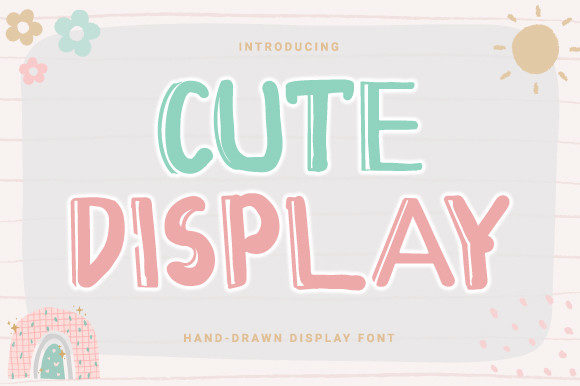
Opening the Cute Display font file, the first thing that hits you is the balance between whimsy and polish. It’s not just another overly sweet typeface trying too hard to be “cute.” Instead, Cute Display feels intentional — like it was built for visual impact without sacrificing legibility or versatility. The rounded edges and soft curves give it a friendly, approachable tone, while the consistent stroke weight keeps it grounded and professional.
From a design psychology standpoint, this font lands somewhere between youthful energy and modern restraint. It doesn’t scream “kids’ brand” — it whispers “lifestyle brand with personality.” That makes it a solid contender for everything from boutique packaging to digital content that needs a warm, human touch.
Real-World Performance: Where Cute Display Shines
Let’s talk application. Cute Display is a display font, which means it’s not built for body copy — and that’s fine. What matters is how it performs in the spaces it’s meant for. Here’s a breakdown of where it truly works:
- Logo Design: It holds up well as a primary logo typeface, especially for brands that want to feel personable without veering into overly casual territory. Just keep the logotype short and avoid intricate color gradients that might muddy its clean lines.
- Brand Identity: Paired with a clean sans serif or a minimalist serif, Cute Display can anchor a brand’s personality without overwhelming it. It reads as modern and intentional, not gimmicky.
- Packaging & Product Labels: Works great on soft goods, greeting cards, candles, and artisanal products. The rounded forms read well on textured materials, and the character spacing holds up even in small print runs.
- Print & Digital Marketing: Flyers, social media headers, and Canva templates benefit from its visual warmth. It’s especially effective in lifestyle, wellness, and creative niches where approachability is key.
- Merch & Printables: Cute Display is a natural fit for mugs, stickers, planners, and digital downloads. Its character design makes it recognizable even at a glance, which helps with brand recall.
When to Use It with Caution
Despite its strengths, Cute Display isn’t a one-size-fits-all solution. Here are some situations where it needs thoughtful handling:
- Large Headlines on Busy Backgrounds: The soft curves can get lost against complex textures or dark gradients. Always test in context.
- Extended Supporting Text: It’s not designed for paragraph use. Stick to headlines, captions, and short bursts of copy.
- Formal or Corporate Contexts: While it can work for casual B2B brands, Cute Display reads as lifestyle-oriented. It’s not the best fit for legal, medical, or ultra-professional applications.
- Small-Size Readability: It starts to lose clarity under 12pt. Always preview in black and white and at intended print sizes before finalizing.
How Cute Display Impacts Design Outcomes
Fonts shape more than aesthetics — they influence perception. Here’s how Cute Display affects key design elements:
- Readability: Strong at a glance, but not for extended reading. Perfect for social media hooks and packaging tags.
- Hierarchy: Great for top-level headers. Pairs well with more neutral fonts to create visual contrast.
- Brand Consistency: Its distinct character helps with recognition, but be cautious about overusing it across too many assets.
- Audience Trust: Feels authentic and human, which builds connection — especially with millennial and Gen Z audiences.
- Professionalism: Surprisingly clean when used in moderation. Avoid using it in all caps across too many touchpoints, or it can feel juvenile.
- Visual Mood: Friendly, modern, and slightly nostalgic. It leans into a “handmade but not hand-drawn” vibe that works for curated brands.
Practical Designer Notes for Real-World Use
If you’re considering Cute Display for a client or personal brand project, here are some hands-on tips to ensure it works as intended:
- Test in Black and White: Some of the softness gets lost without color. Make sure it still reads clearly in monochrome.
- Check Small Sizes: Print out samples at 12pt and 18pt to see how it holds up in physical form.
- Use Real Mockups: Don’t just preview on screen. Try it on product mockups, business cards, and packaging templates to see how it integrates.
- Compare Uppercase vs Lowercase: Lowercase reads more casual and inviting, uppercase feels bolder and more assertive. Choose based on tone.
- Review Spacing: Kerning is generally tight, so adjust manually for headlines to prevent letter collisions.
- Pair with Other Fonts: Try it with a serif for contrast, a script for flow, or a clean sans-serif for balance. Avoid pairing with other display fonts unless you’re experienced with font hierarchy.
- Confirm Licensing: If you're using Cute Display in a commercial font, make sure the license covers client work, digital products, and any resale assets like Canva templates or Cricut designs.
Final Thoughts: A Display Font That Delivers
Cute Display isn’t just another trendy font floating around design marketplaces. It’s a thoughtfully crafted typeface that serves a clear purpose — and that’s rare in the sea of generic display fonts. As a designer, I appreciate that it doesn’t try to be everything to everyone. It knows its role and plays it well.
If you're building a brand or creative project that needs a touch of warmth without sacrificing modernity, Cute Display is worth a serious look. Just remember to use it intentionally, test it thoroughly, and pair it wisely. Like any creative font, it shines brightest when it supports — not overshadows — your overall design.