Gondrin: A Futuristic Display Font for Modern Editorial Design
Choosing the Right Typeface for a Lifestyle Blog Redesign
As I began redesigning my lifestyle blog’s header and feature pages, I found myself drawn to typefaces that could communicate both elegance and modernity. The goal was to create a visual identity that felt intentional, clean, and subtly futuristic. That’s when I discovered Gondrin—a display font that immediately caught my eye with its unique balance of structure and fluidity.
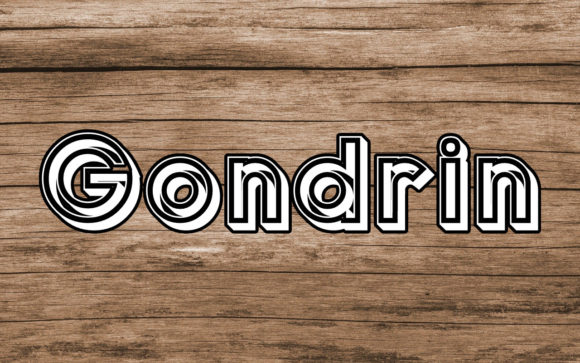
Gondrin isn’t your typical serif or sans serif. It carries a visual rhythm that feels both architectural and expressive, making it ideal for titles, pull quotes, and other editorial accents. Its characters are bold yet refined, with subtle curves that add warmth without sacrificing clarity. It has that rare ability to feel solemn and stylish at the same time, which made it a perfect fit for a blog focused on mindful living and curated design.
How Gondrin Enhances Editorial Layouts
One of the first places I tested Gondrin was in the blog’s header. I wanted something that would stand out on both desktop and mobile without overwhelming the reader. I paired it with a clean sans serif for navigation and body text, and the contrast worked beautifully. The font’s structured weight gave the header a strong presence, while its open spacing ensured legibility across screen sizes.
For feature articles, I used Gondrin in pull quotes and section headings. It added a visual anchor to the layout, drawing the eye without pulling focus from the content itself. The font’s futuristic edge also gave the blog a subtle edge of innovation—perfect for a publication that covers design, wellness, and creative living.
When to Use Gondrin in Digital and Print Publications
Gondrin shines in titles, cover text, and decorative accents. It’s not ideal for long-form body copy due to its stylized structure, but that’s exactly what makes it so effective in editorial design. Here are a few practical use cases where Gondrin truly comes to life:
- Blog headers and article titles – Its strong visual presence makes it a natural fit for digital branding.
- Ebook covers and chapter openers – Use it to introduce a mood or theme with elegance and clarity.
- Printable planners and workbooks – Gondrin adds a touch of sophistication to headers and section dividers.
- Newsletter graphics and digital magazines – Perfect for creating visual rhythm and guiding the reader’s attention.
Its multilingual support and included alternates make it versatile for international audiences and design variations. Whether you’re designing a recipe ebook or a coaching workbook, Gondrin adapts with grace and clarity.
Readability Across Formats
When choosing a font for editorial use, readability is key—especially when content appears across multiple platforms. I tested Gondrin in both digital and print formats, including PDF exports and mobile previews. On screen, it held up well in larger sizes, maintaining its structure without pixelation. For print, the font’s clean lines and balanced proportions ensured it looked just as sharp in a physical planner or magazine cover.
That said, I found it best to use Gondrin at 24pt or larger to preserve legibility. At smaller sizes, some of its finer details began to blur, which is a common trade-off with display fonts. As long as it’s used intentionally, Gondrin remains a strong choice for editorial designers looking to elevate their visual hierarchy.
Font Pairing for a Cohesive Design
One of the most rewarding aspects of using Gondrin was experimenting with font pairings. Since it’s a display font, I paired it with more readable companions to maintain balance in the layout. For example:
- Serif body fonts – For a classic editorial feel, I paired Gondrin with a refined serif like Georgia or a modern alternative like Crimson Text.
- Clean sans serifs – For digital layouts, I used fonts like Lato or Open Sans to create a modern contrast that felt cohesive yet dynamic.
- Minimalist scripts – Occasionally, I introduced a soft script for captions or quotes to add a touch of warmth and movement.
These pairings helped maintain a clear visual hierarchy while letting Gondrin do what it does best—command attention without overpowering the page.
What to Consider Before Downloading Gondrin
Before using Gondrin in your next project, especially if it’s commercial, be sure to check the licensing details. As a freebie, it’s often available for personal use, but commercial applications—like in ebooks, templates, or client work—may require a premium license.
Also, review the included styles, ligatures, and alternates. Some display fonts offer multiple variations that can enhance your design, especially in titles and logos. Make sure the font supports the languages you need and comes in compatible formats like OTF or TTF for use across design tools.
Final Impressions
Gondrin is more than just a font—it’s a design asset that brings personality and structure to editorial layouts. Whether you’re crafting a digital magazine, redesigning a blog header, or putting together a printable planner, Gondrin offers a refined yet futuristic aesthetic that elevates your content.
It reminds me of why typography matters—not just for style, but for storytelling. A well-chosen font can shape the reader’s experience, guide their attention, and even influence how they feel about the content. With Gondrin, that experience becomes more intentional, more memorable, and more visually engaging.