Iron Shark Font: A Web Designer’s Take on Using Futuristic Typography
Choosing the Right Typeface for a Creative Portfolio Homepage
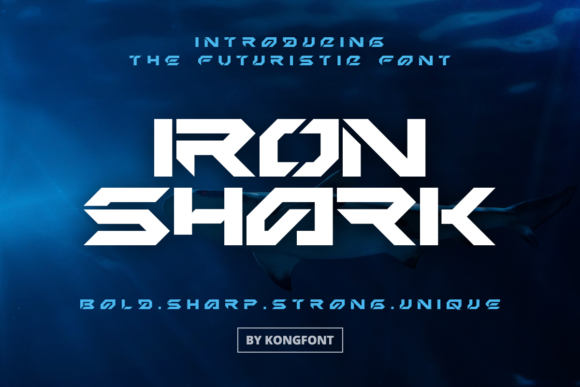
I recently started building a portfolio site for a digital artist who wanted a bold, modern look. The homepage hero section needed a strong headline font that would set the tone without overpowering the visuals. That’s when I came across Iron Shark—a futuristic display font from the Freebies section of a design marketplace. It caught my eye immediately with its clean edges and dynamic curves. I dropped it into the hero banner and started testing how it performed across devices and design contexts.
First Impressions: What Is Iron Shark?
Iron Shark is a script-style display font with a modern twist. It doesn’t feel like a traditional handwritten font, but rather something digitally sculpted—sleek, intentional, and full of personality. It’s the kind of typeface that works well in digital environments where you want to communicate creativity without sacrificing legibility.
As a web designer, I’m always looking for fonts that can bridge the gap between visual interest and usability. Iron Shark walks that line well. It’s not meant for long paragraphs, but it shines in headlines, logo treatments, and decorative accents.
Testing in the Wild: Hero Section and Mobile Readability
I placed Iron Shark in the hero headline of the portfolio homepage, overlaying it on a dark image background with a subtle gradient overlay. At desktop size, it looked fantastic—dynamic, confident, and modern. But I knew I had to check how it performed on mobile.
At smaller sizes, some of the finer strokes started to blur together on lower-resolution screens. I adjusted the font weight and increased the letter spacing slightly to improve clarity. It wasn’t perfect for ultra-small buttons, but as a headline font on mobile, it held up well when used at 24px or larger.
Where Iron Shark Excels in Web Design
From my testing, here are the contexts where Iron Shark really stood out:
- Hero headlines – Especially when paired with minimal backgrounds or bold imagery
- Logo treatments – Great for stylized brand names that want to feel digital and forward-thinking
- Call-to-action buttons – Works best when used sparingly and in a lighter background context
- Section headers – Adds visual rhythm to a scrollable page without being overwhelming
- Social media graphics – Perfect for quote cards or promotional banners
Font Pairing Tips for Better Visual Hierarchy
Since Iron Shark is a decorative display font, I wouldn’t recommend using it for body copy or long-form content. Instead, I paired it with a clean sans serif font for paragraph text. The contrast between the futuristic headline and the neutral body text helped guide the user’s eye naturally through the content.
For a more editorial feel, I could also see pairing it with a serif font in a digital magazine layout or a blog redesign. The key is balance—let Iron Shark be the star of the show, and keep supporting fonts simple and readable.
Practical Considerations for Web Use
Before committing to any font for a live site, I always check a few technical aspects:
- Webfont availability – Iron Shark was available in WOFF and OTF formats, which is great for modern browsers
- Font weights and alternates – I found a couple of stylistic alternates included, which added flexibility
- Licensing – Since it’s listed under Freebies, I double-checked the commercial use permissions for client work
- Multilingual support – Covered basic Latin characters, which was enough for this project
Also, I made sure to load it efficiently using a font loader to avoid flash of invisible text (FOIT) on the live site.
Real-World Use Cases for Iron Shark
Here are a few other scenarios where I’ve seen Iron Shark make a strong impact:
- Product landing pages – Especially for tech tools or creative software
- Online course sales pages – Adds a dynamic feel to course titles and instructor names
- Boutique store banners – Works well in limited quantities for sale headlines or featured product names
- Event campaign pages – Great for creating a memorable visual hook in the top fold
Readability and Layout Performance
One thing I noticed during testing was how Iron Shark affected scanning behavior. Because of its unique character shapes, users paused slightly longer on headlines, which can be a good thing if you want to emphasize key messaging.
However, overusing it across the site made the layout feel cluttered. I ended up limiting it to primary headers and one or two accent elements per page. This helped maintain a sense of visual hierarchy and professionalism.
Final Thoughts: Is Iron Shark Right for Your Project?
If you’re working on a digital brand kit, portfolio homepage, or campaign landing page, Iron Shark is definitely worth trying. It brings a futuristic, creative edge that can elevate your visual identity—especially when used strategically.
Just remember to test it across devices, pair it with clean supporting fonts, and always check the licensing before deploying it in client work or commercial projects. As a free script font with modern appeal, it’s a solid addition to any web designer’s toolkit.