Pallini: A Classic Digital Display Font for Editorial Design
As a content creator who regularly designs newsletters, blog headers, and ebook covers, I’m always on the lookout for typefaces that balance visual appeal with editorial functionality. Pallini, a free display font created by Rikyozone, has become a quiet favorite in my toolkit. Its light weight and digital aesthetic offer a modern yet timeless tone that works well across publishing formats.
Understanding Pallini’s Visual Style
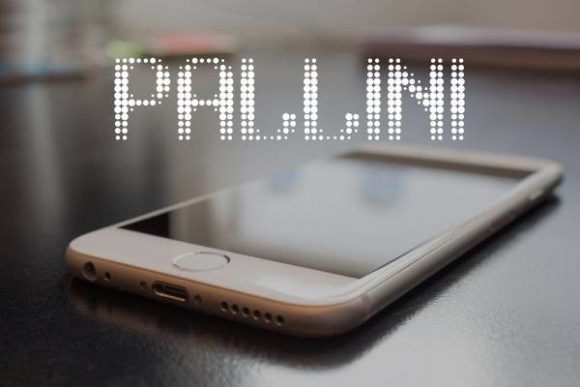
Pallini is a display font with a minimalist digital structure. It carries a subtle retro vibe without feeling outdated, making it ideal for projects that need a touch of personality without overwhelming the message. The font’s clean lines and open spacing contribute to its legibility, especially at larger sizes. Unlike heavier display fonts that can feel cluttered, Pallini maintains a refined simplicity that works well in both print and digital formats.
Its personality leans toward the elegant and understated—perfect for editorial projects that want to feel curated and intentional. Whether used in a lifestyle blog header or a printable worksheet, Pallini adds a visual tone that’s modern yet accessible.
How Pallini Supports Editorial Design
One of the most powerful uses of Pallini is in editorial design. Because it’s a display font, it shines in short bursts of text—like headlines, subheadings, and pull quotes. It’s particularly effective in blog headers and digital magazine covers where visual impact matters. The font’s light weight ensures it doesn’t overpower other design elements, allowing it to coexist gracefully with imagery and layout grids.
For ebook creators, Pallini works well as a title font on cover pages or as a chapter opener. Its digital clarity ensures it reads cleanly on screen, whether viewed on a phone or a tablet. Similarly, in newsletters, Pallini can be used for quote graphics or callout text that needs to stand out without feeling forced.
Practical Applications Across Content Formats
I’ve used Pallini in a number of different publishing contexts with strong results. In a recent recipe ebook I designed, I used it for the title page and section headers. Its clean, modern appearance complemented the food photography without competing for attention. For a wedding planning guide, Pallini lent a soft, elegant tone to the chapter titles and pull quotes.
Printable planners and worksheets also benefit from Pallini’s clarity. I’ve used it for weekly headers and motivational quotes where a light, readable font is needed. In digital magazines, it works well for feature headlines and branding elements like mastheads or bylines. For creators building a brand identity, Pallini’s distinct yet approachable look helps establish a consistent visual tone across different media.
Visual Hierarchy and Reader Engagement
When designing content for blogs, newsletters, or guides, visual hierarchy is crucial. Pallini contributes to that hierarchy by naturally drawing the reader’s eye to key sections. Because it’s a display font, it’s best used in short-form text—like titles, subtitles, and accent typography. It’s not ideal for long body copy, but when paired with a readable serif or sans serif font, it becomes a strong design asset.
For example, pairing Pallini with a clean serif font like Georgia or a modern sans serif like Open Sans allows for a balanced layout. The contrast between the decorative headline and the simple body text creates a rhythm that guides the reader through the content. This kind of thoughtful font pairing supports readability and enhances the overall reader experience.
Readability Across Devices and Formats
One of the concerns when choosing a font for digital content is how it renders across devices. Pallini holds up well on screen, especially in larger sizes. Its light weight can sometimes feel too delicate in body text, but as a headline font, it remains crisp and clear. When exporting to PDF or printing, Pallini retains its clean structure, making it a versatile choice for both digital and physical formats.
For mobile layouts, it’s important to ensure that the font remains legible even at smaller sizes. While Pallini is best used at medium to large sizes, testing its application in mobile-responsive designs is a good idea—especially when used for callout text or quote graphics.
Font Pairing for Editorial Projects
Font pairing is one of the most important aspects of editorial design, and Pallini pairs well with a variety of supporting typefaces. Since it’s a display font, it benefits from being contrasted with a more neutral body font. For example, using Pallini for a feature headline and a serif font like Merriweather for the article text creates a visually balanced layout.
For digital magazines or newsletters, pairing Pallini with a clean sans serif like Lato or Roboto for captions, navigation, or sidebar text ensures that the design feels cohesive yet functional. The key is to let Pallini be the standout element while using supporting fonts to maintain readability and structure.
Checking Font Features and Licensing
Before using Pallini in your next project, it’s worth checking what font styles and features are included. Many free display fonts come with limited weights or character sets, which can affect their usability in multilingual or complex layouts. Pallini, being a freebie, is well-suited for English content and basic design needs.
From a licensing perspective, Pallini is typically available under a free license, but it’s important to confirm whether it can be used for commercial purposes. If you’re creating a paid newsletter template, a client-facing publication, or a digital download, make sure the font’s license permits such use. Some free fonts require attribution or have restrictions on commercial redistribution.