Quadrant Display: A Bold Choice for Modern Web Typography
Testing Quadrant Display in a Real Web Project
While working on a portfolio homepage for a creative client, I found myself searching for a font that could stand out without sacrificing usability. I stumbled upon Quadrant Display and decided to test it in the hero section. At first glance, it immediately added a sense of elegance and modernity to the layout. Its geometric structure and subtle contrast gave the site a refined edge that matched the client’s visual identity.
What Makes Quadrant Display Unique?
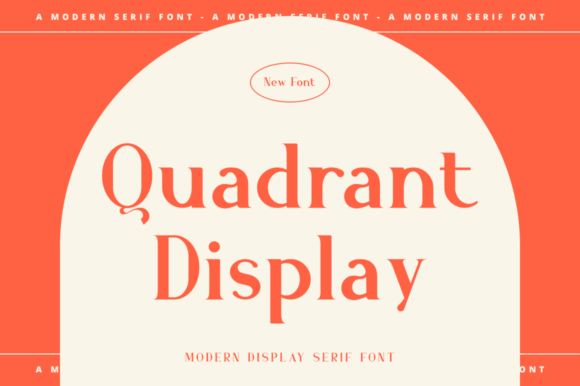
Quadrant Display is a display font that blends clean modernity with a touch of personality. It’s not overly decorative, but it carries enough visual interest to elevate headlines, banners, and branding elements. The font’s open letterforms and balanced spacing make it surprisingly readable, especially for a display typeface. It works well across a variety of digital contexts—from hero titles to call-to-action buttons—without feeling out of place.
Its design has a quiet confidence. It doesn’t scream for attention but draws the eye naturally. This makes it ideal for digital spaces where visual clarity and brand tone matter equally.
Using Quadrant Display in Web Layouts
I started by placing it in the hero section of the portfolio site. The headline, set in Quadrant Display over a full-width image banner, felt instantly more intentional. It didn’t compete with the visuals but instead framed them beautifully. I also tested it in section headings and noticed how it helped establish a clear visual hierarchy. Each section felt more defined, and the font’s uniformity helped maintain a clean, cohesive layout.
Here are a few places where Quadrant Display worked especially well:
- Hero titles – Strong presence without overwhelming the background
- Call-to-action buttons – Clear and inviting, even at smaller sizes
- Logo text or brand headers – Offers a modern alternative to standard sans serifs
- Blog headers – Adds personality without disrupting readability
Readability and Responsiveness
One of the first things I checked was how Quadrant Display performed on mobile screens. I was pleased to find that it maintained its clarity even at smaller sizes, especially when used in buttons or short headings. However, I wouldn’t recommend it for long body text or multi-line navigation labels. It shines brightest in short, impactful phrases.
For dark backgrounds, I adjusted the letter spacing slightly and made sure the color contrast was high enough. On light backgrounds, it looked crisp and modern. When placed over images, I used a semi-transparent overlay to ensure the text remained legible.
Font Pairing Tips for Web Designers
Since Quadrant Display is a display font, I paired it with a clean sans serif for body copy and secondary text. This created a nice balance between structure and personality. For a more editorial feel, I tried it with a subtle serif font in a blog header layout, and the contrast worked surprisingly well.
Here’s a quick pairing suggestion:
- Primary header: Quadrant Display (bold weight)
- Body text: A neutral sans serif like Open Sans or Inter
- Accent or quote text: A serif like Merriweather or Playfair Display
This combination kept the layout visually dynamic while ensuring readability and accessibility across devices.
Practical Design Considerations
Before finalizing the font for the project, I made sure to check the available styles, weights, and webfont formats. Quadrant Display comes with multiple weights and supports multilingual characters, which was a big plus for future scalability. I also verified the licensing terms to ensure it could be used in commercial projects and client websites without restrictions.
From a performance standpoint, the webfont files were lightweight and optimized for fast loading. This is crucial for maintaining good page speed scores and overall user experience.
When to Use Quadrant Display
While Quadrant Display is versatile, it’s best used in specific digital contexts. Here’s where it truly shines:
- Hero sections – Adds visual impact without being overwhelming
- Brand headers and logos – Offers a modern, clean look
- Call-to-action buttons – Stands out clearly in conversion-focused areas
- Short promotional phrases – Works well in banners or campaign landing pages
It’s less ideal for long paragraphs or small interface elements like form labels. But as a display font, it delivers exactly what it promises—clarity, style, and professionalism.
Final Thoughts on Quadrant Display
After testing it across multiple layouts and screen sizes, I found Quadrant Display to be a reliable and stylish choice for digital branding. It elevated the portfolio homepage and helped create a more polished, intentional design. Whether you're building a boutique online store, a coaching website, or a product landing page, this font can help your brand stand out with quiet confidence.
If you're looking for a display font that balances elegance with usability, Quadrant Display is definitely worth testing in your next web project.