ShoCard Caps: A Retro Display Font That Elevates Campaign Visuals
Choosing the Right Typeface for a Product Launch Graphic
I was prepping a product launch graphic for a client’s new line of vintage-inspired accessories when I came across ShoCard Caps. I needed a font that could capture the essence of retro design while still feeling fresh and modern. As a marketing designer who regularly works across Instagram, Pinterest, and email campaigns, I’m always on the hunt for fonts that can pull double duty—communicating brand tone while standing out in fast-scrolling feeds.
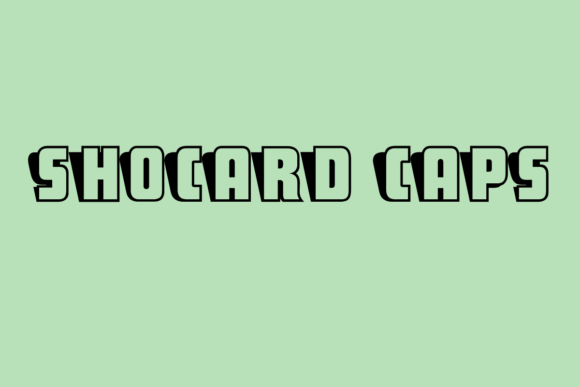
ShoCard Caps immediately caught my eye. It’s a retro-style display font with a 3D-like depth that gives it a tactile, almost handcrafted feel. It’s not overly stylized, which makes it versatile for digital use. I dropped it into the headline of a promotional image for a limited-time drop, and right away, it gave the design a nostalgic punch without feeling outdated.
How ShoCard Caps Performs in Real Campaign Contexts
Over the next few weeks, I tested ShoCard Caps across several campaign visuals. I used it for a YouTube thumbnail series promoting a vintage fashion haul, a Pinterest campaign for a retro home decor line, and even a branded Instagram story template for a seasonal sale.
In each case, the font performed well. Its bold structure and dimensional character shapes made headlines and callouts pop, even in small preview sizes. On Instagram, where users often scroll quickly, the visual weight of the type helped slow the eye just enough to absorb the message. On Pinterest, where visual discovery is key, the font added a curated, editorial quality that felt intentional and brand-aligned.
When and Where to Use ShoCard Caps
ShoCard Caps shines in short, high-impact text. It’s best suited for:
- Headlines in posters, flyers, and digital ads
- YouTube thumbnails and Reels covers
- Instagram stories and carousel headers
- Pinterest pins and quote graphics
- Webinar banners and email promo headers
It’s not ideal for long-form text or small body copy. The font’s decorative nature can make it harder to read at smaller sizes or in dense layouts. That said, when used as a display font or logo-style treatment, it adds a strong visual identity that’s both memorable and distinctive.
Readability and Design Considerations
I tested ShoCard Caps on both light and dark backgrounds. It looked crisp on a white background with a subtle shadow effect, and it held up well on a dark charcoal background with a light stroke overlay. For mobile previews—especially in email banners and story highlights—I adjusted the tracking slightly to ensure clarity on smaller screens.
One thing to note: because of the font’s dimensional style, it can sometimes blend into complex image backgrounds. I found that adding a light drop shadow or a semi-transparent overlay behind the text improved contrast and readability significantly.
Font Pairing and Brand Consistency
Pairing ShoCard Caps with a clean sans serif like Montserrat or Open Sans helped balance the design. I used it for headlines and supporting copy in a webinar campaign, where the retro title needed to feel approachable but professional. The contrast between the bold, textured headline and the sleek body text created a clear visual hierarchy that guided the viewer’s eye naturally.
For a more editorial look—like in a Pinterest post or a quote graphic—I paired it with a serif font such as Merriweather. The mix of old-world elegance and retro charm gave the design a layered, curated feel that resonated with the target audience.
What to Watch Out For
While ShoCard Caps is a strong visual performer, it’s not a one-size-fits-all solution. I wouldn’t recommend it for:
- Formal corporate communications
- Dense product descriptions or technical copy
- Small UI elements or navigation labels
- Long paragraphs in email bodies or landing pages
It’s also worth checking the font’s included styles before use. I was happy to find that it includes uppercase letters and basic punctuation, making it suitable for most promotional text. However, if your campaign requires multilingual support or advanced typographic features like ligatures or alternates, be sure to verify that the font includes those before deploying it at scale.
Final Take: A Solid Freebie for Campaign Designers
As a free font in the Freebies category, ShoCard Caps delivers real value. It’s a smart choice for designers looking to inject a vintage vibe into their visuals without sacrificing legibility or brand clarity. Whether you're designing a sale announcement, product teaser, or content series, this creative font can help your message stand out while reinforcing a consistent visual tone across your campaign assets.