So Cute so Cool: A Quirky Display Font for Digital Designers
Testing So Cute so Cool in a Real Web Layout
As a web designer, I’m always on the lookout for fresh, expressive typefaces that bring personality to a digital brand. Recently, I had the chance to test So Cute so Cool in a real-world project — a landing page for a small creative studio looking to refresh their online presence. The goal was to create a playful yet professional tone that stood out from the usual minimalist fonts dominating the market.
I dropped So Cute so Cool into the hero section as the main headline font, paired with a clean sans serif for body copy. The result? Instant charm. The font’s bouncy baseline and rounded edges gave the layout a youthful, approachable feel — perfect for a brand that wanted to feel creative without sacrificing clarity.
Visual Style and Digital Appeal
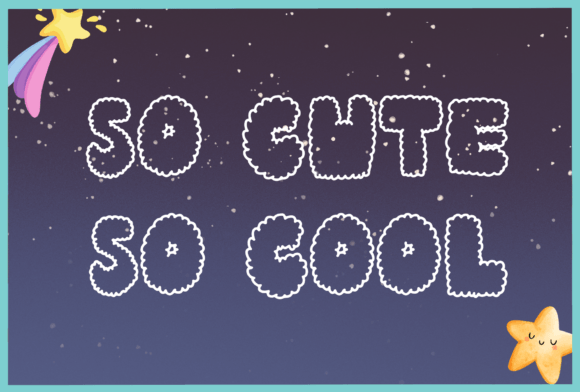
So Cute so Cool is a display font with a hand-drawn, whimsical aesthetic. Each letter feels like it was crafted with a personal touch — slightly uneven strokes, playful curves, and just the right amount of irregularity to feel human and not overly digital. It's the kind of typeface that could easily work in a creative portfolio, a boutique online store, or a lifestyle blog redesign.
What stood out to me was how the font maintained its character even at smaller sizes on mobile. While it’s definitely best suited for larger headings and accents, I was surprised at how readable it was as a subheading on a tablet screen. That said, I wouldn’t recommend it for long body copy or small interface text — its decorative nature makes it a better fit for visual hierarchy than for extended reading.
Using So Cute so Cool in Real Web Design Scenarios
Let’s break down how this font performed across different parts of the website:
- Hero Section: Perfect. As a large headline over a soft background image, it drew attention and felt lively without being overwhelming.
- Call-to-Action Buttons: Good, but with caution. At medium sizes, some of the more intricate letterforms (like the lowercase “g” and “y”) became slightly less distinct. I adjusted spacing and added a slight shadow for better contrast.
- Navigation Menu: Not ideal. The font’s decorative style made it feel out of place in a standard top navigation bar. I swapped it out for a simpler sans serif to keep the menu clean and scannable.
- Blog Headers: Nice touch. Used sparingly in article headers and pull quotes, it added visual interest and helped break up content blocks without distracting from the message.
In a product landing page mockup I tested later, I used So Cute so Cool for the main headline and feature highlights. It worked especially well in a “limited-time offer” banner — the font’s energetic vibe made the message feel more urgent and exciting.
Readability and Responsive Design Tips
When working with decorative display fonts like this one, it’s important to keep readability in mind — especially on smaller screens. Here are a few tips I picked up while using So Cute so Cool:
- Use it for headlines only. Stick to body fonts that are more legible for longer content.
- Check spacing on mobile. Kerning can look different on smaller screens, so always preview on real devices.
- Pair wisely. A clean, modern sans serif like Montserrat or Open Sans balances the font beautifully.
- Optimize for contrast. If placing the font over a background image or dark overlay, consider adding a subtle text shadow or background blur for readability.
Font Pairing and Brand Consistency
One of the most satisfying parts of the project was experimenting with font pairing. I paired So Cute so Cool with Inter for body text and Playfair Display for subheadings. The combination created a layered, dynamic layout that felt cohesive and intentional.
This mix worked especially well for a digital brand kit I was developing alongside the website. The client wanted a style that felt both creative and trustworthy — and the contrast between the playful headline font and the more grounded body fonts achieved that balance.
What to Watch Out For
While So Cute so Cool brings a lot of personality to the table, it’s not a one-size-fits-all solution. Here are a few limitations I noticed:
- Not suitable for small UI elements: Navigation links, form labels, or dashboard text can become hard to read.
- Limited weight options: I found myself wishing for a bold or light version to create more visual contrast without changing font sizes dramatically.
- Accessibility considerations: Always test with screen readers and ensure sufficient color contrast when using this font for anything clickable or interactive.
Also, be sure to check the font’s licensing before using it in client projects or online stores. Since it’s part of the Freebies category, it’s often great for personal use, but commercial projects may require a premium license or attribution.
Final Thoughts: A Playful Typeface with Real Digital Potential
Overall, I found So Cute so Cool to be a fun, expressive display font that adds a touch of whimsy without feeling childish or unprofessional. Whether you're designing a course sales page, a portfolio homepage, or a small business website, this font can help your brand stand out in a crowded digital space.
Just remember to use it thoughtfully — as a highlight, not a default. Paired with the right supporting fonts and used in the right contexts, So Cute so Cool can become a memorable part of your brand identity and enhance the overall user experience of your site.